



You now have the perfect way to adjust DocuWare IDP workflows in your portfolio: Your clients can now train their IDP models for classification and document splitting right within DocuWare, using their own documents. Training data is simply selected from the file cabinet; documents are then transferred securely and processed.
Until now, IDP models could only be trained by manually uploading documents to the IDP platform. Now the training documents can be selected right from the DocuWare File Cabinet.
How it works
Within DocuWare Configuration, users can start training document splitters and classifiers from the DocuWare IDP section.
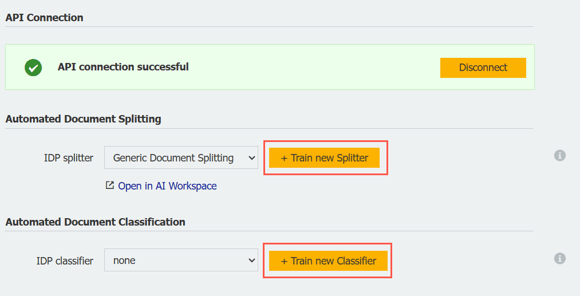
A single click opens a window with all the information required to create a new splitter or classifier, and you will be walked through training process step by step. At the same time, a list of file cabinets will be displayed from which you can select the training documents.
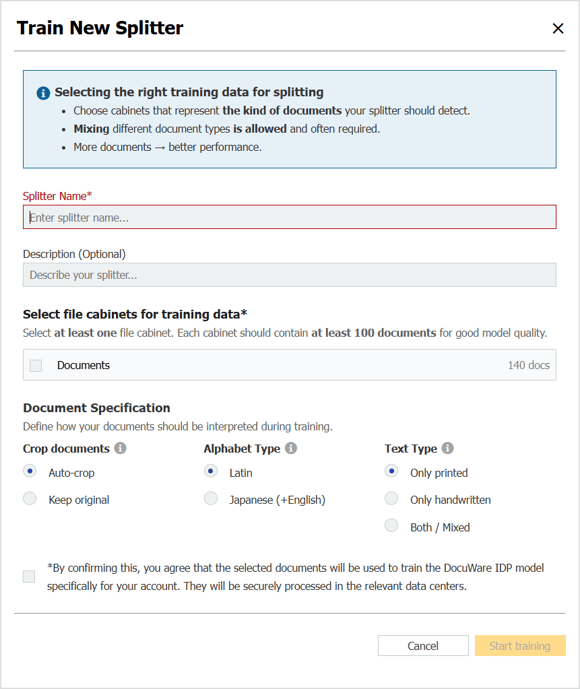
For splitting, choose at least one file cabinet.
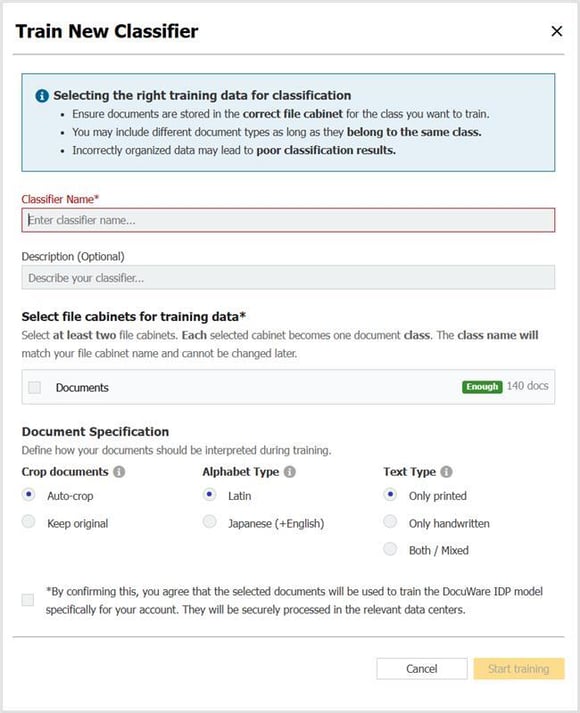
For classification, choose at least two different file cabinets. An indicator will show whether the file cabinet contains enough documents for training.
Training the model can take up to 24 hours. Multiple trainings can be carried out in parallel; in other words, a new training can be created and started while another one is still running.
Coming soon
We are working on training for extraction models; this feature will be available soon. In addition, for classification training, it will soon be possible to select an index field in addition to the selected file cabinet, allowing the different values in that index field to be recognized and trained as separate document classes.