



With automatic document splitting in DocuWare IDP, your customers save valuable time handling bulk scans—and this useful feature is now also available via the Desktop Apps. Bulk scans are automatically split into separate documents—without the need for separator sheets or barcode stickers. The individual PDFs can then be processed in additional workflows anywhere in the company, which speeds up downstream processes significantly.
Automatic splitting—quick setup in Desktop Apps
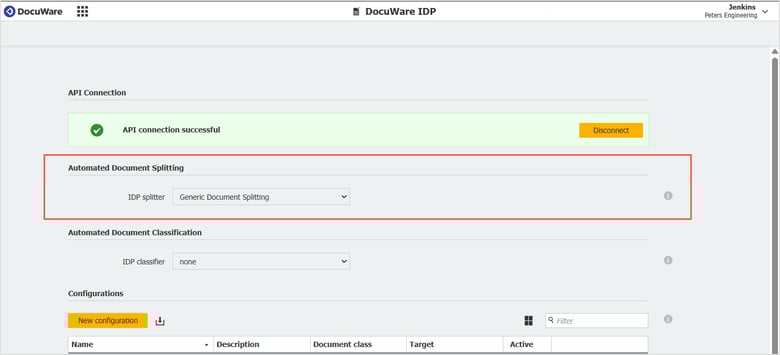
In DocuWare Configuration, the new option “Automatic document splitting” is now available under DocuWare IDP.
In the dropdown menu, choose a suitable “IDP Separator” for your instance in the IDP platform. This allows multi-page PDF files to be automatically split into individual documents during scanning or import.
In the Desktop Apps themselves, go to the import or scan jobs and select the IDP configuration in which you have set up document splitting. The splitting process will then be carried out automatically.
Monitoring and transparency included
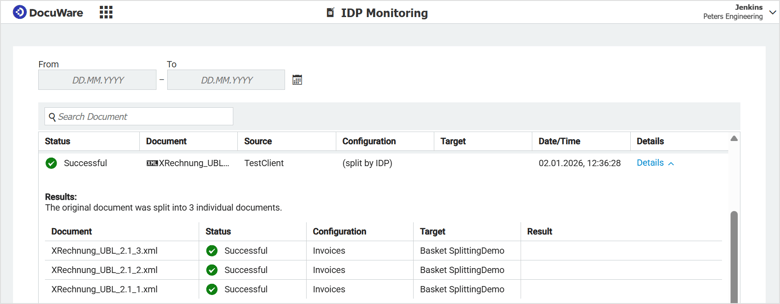
All IDP jobs that are processed with the splitting function will be visible in IDP monitoring. The original file is shown first, followed by information on the individual documents created from it.
Coming soon: A Connect to Mail integration for automatic document splitting via IDP is also planned, and will be introduced in a future update.
Additional information is available in the DocuWare Knowledge Center: https://go.docuware.com/27576