



Have you recently encountered issues accessing your DocuWare for IDP demo environment? Don’t worry — you’re not alone! This hiccup may be due to an expired API key. When the API key expires, your connection to the Intelligent Document Processing (IDP) models is disrupted, and system access comes to a halt. Let’s get you back up and running in no time with a few simple steps.
What’s happening and how does it affect you?
The DocuWare for IDP demo requires a valid, up-to-date API key to function. Once expired, the demo system can no longer communicate with the IDP models, leaving you unable to experience the latest features and demonstrate them to your clients.
How to get a valid API Key
-
Download the latest system version:
Log in to My Business and access the Document Pool. Download the latest version of the “DocuWare for IDP” demo in your language.
-
Find your new API key:
Along with the new version, you’ll find the manual document in the package. The new API key is included inside the manual.
Update your system in a few easy steps
-
Retrieve the new API key from the manual you downloaded.
-
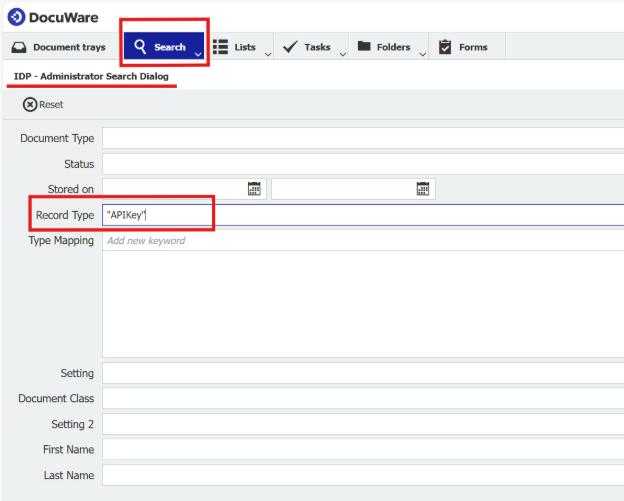
In your existing system, use the search dialogue “IDP – Administrator” to find the “APIKey” record
- Edit the index entries of this document as shown below and update the field “Setting”.
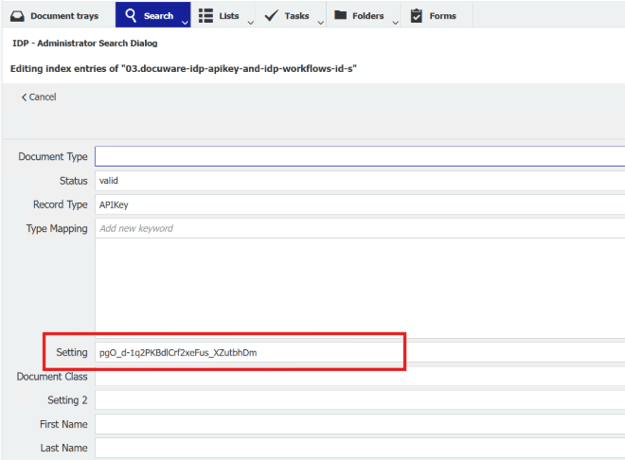
- Save your changes
Happy demoing!
