
These are the key features of the latest update of the DocuWare Outlook Add-in:
Storage process: manual or configuration based
-
Users can easily switch between manual and configuration-based storage at any time via the “Store Locations” category.
-
On a dedicated page for configuration-based storing, users can choose from available manual storage “Outlook Email” (Connect to Outlook) configurations, including their options and attachment filters managed at the configuration level.
-
“Send and Store” allowing single-click archiving of sent emails according to predefined settings is now also supported by the DocuWare Outlook Add-in. Users can select the desired “Outlook Email” (Connect to Outlook) configuration on the new “Send and Store” page.
-
Automatic storing of sent emails when both “Send and Store” and “Automatically store all emails” are enabled, with no user interaction required once configured.
-
Expanded support for DocuWare Intelligent Document Processing (IDP) configurations in cloud environments, enabling users to store emails in file cabinets via IDP with new visual cues and automated processing flows.
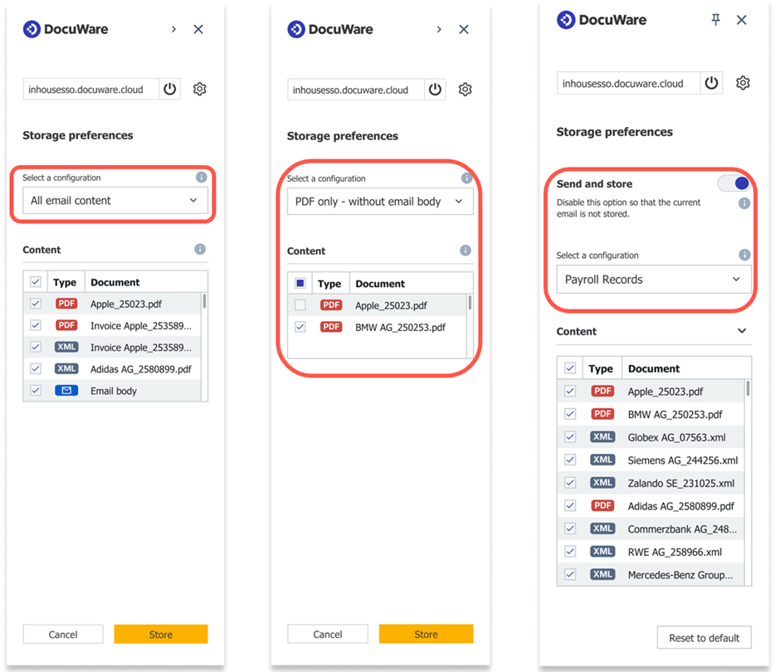
It’s now possible to use manual storage “Outlook Email” (Connect to Outlook) configurations in the DocuWare add-in for Microsoft Outlook.
User guidance and user experience
-
Enhanced user guidance in the web client, with dynamic info banners clearly indicating which features and configurations are compatible with the DocuWare Outlook Add-in and Connect to Outlook, and providing real-time feedback based on settings adjustments.
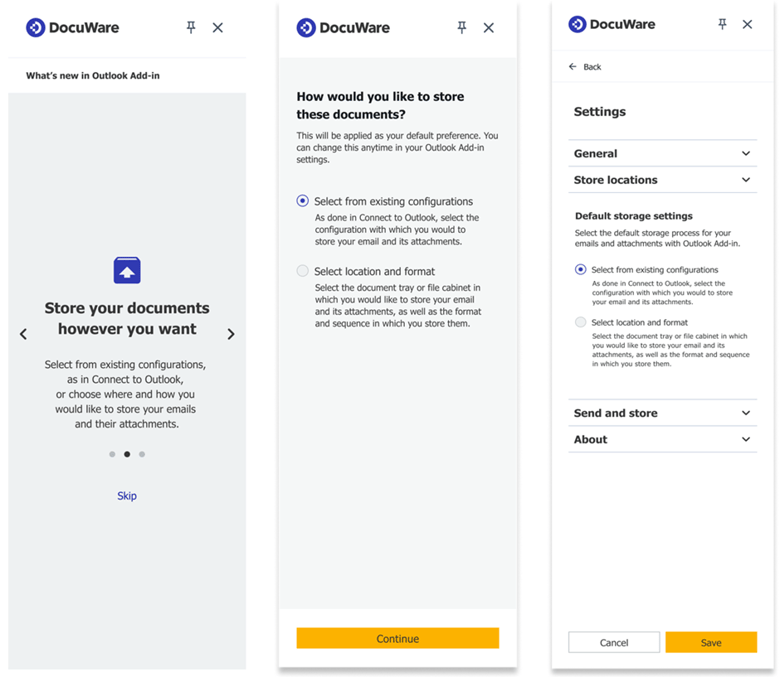
Introduction of a landing page after login, guiding users to select their preferred storage method (manual or configuration-based) before proceeding and a setting allowing users to switch anytime.
Availability
All the cloud customers using the DocuWare for Outlook Add-in will have access to this version in April 2026. The new features will also become available to DocuWare on-premises customers with DocuWare versions 7.14 and 7.13 versions, for both versions expected in June 2026.