
Since version 7.13, it has been possible to pre-fill DocuWare forms, either individually or in workflows. Due to technical reasons, we have made a minor adjustment to the URL format. The generated URL now begins with #pf=on instead of ?pf=on. If the pre-fill feature is used in a workflow, please update the expression in data assignment accordingly.
To minimize the impact on links that have already been saved, URLs in the previous format will be automatically updated upon access. However, a message will be displayed asking users to manually re-save or re-send the new link to relevant parties, as the old format will soon become invalid.
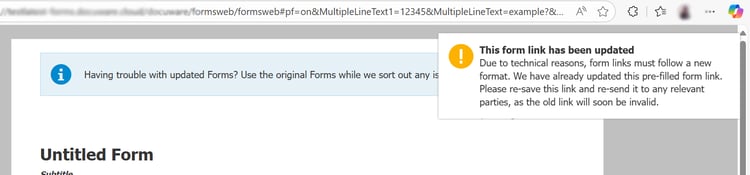
Message about the changed URL format
Editing a URL directly in the browser
If you have a URL in the new format and want to edit it directly in the browser’s address bar, e.g. to change the pre-filled values, please click the browser’s refresh button to reload the page instead of pressing enter. When the form is reloaded, it will display the new values.
More information about the “Pre-fill a Form” feature can be found in the Knowledge Center:
- Release Highlight: Pre-fill option for DocuWare Forms: https://knowledgecenter.docuware.com/docs/news-713-pre-fill-form
- Edit the URL to pre-fill a form:
https://knowledgecenter.docuware.com/help/docs/forms-submission#edit-the-url-to-prefill-a-form - How-to: Send a pre-filled form as a workflow task:
https://knowledgecenter.docuware.com/help/docs/automated-form-pre-filling