For DocuWare Cloud customers, a new era in document management is beginning: Smarter. Faster. AI-powered. And for on-premises customers as well, the latest version of DocuWare offers relevant new features, particularly for the Workflow Designer.
Contents
- New DocuWare – for DocuWare Cloud
- New features in the Workflow Designer – for Cloud and on-premises
- DocuWare Mobile + Update recommendation for on-premises
- Important preparations for version 7.15 – for DocuWare Cloud
- Information about all features – for Cloud + on-premises
- How to get the DocuWare 7.15 update
New DocuWare – for DocuWare Cloud
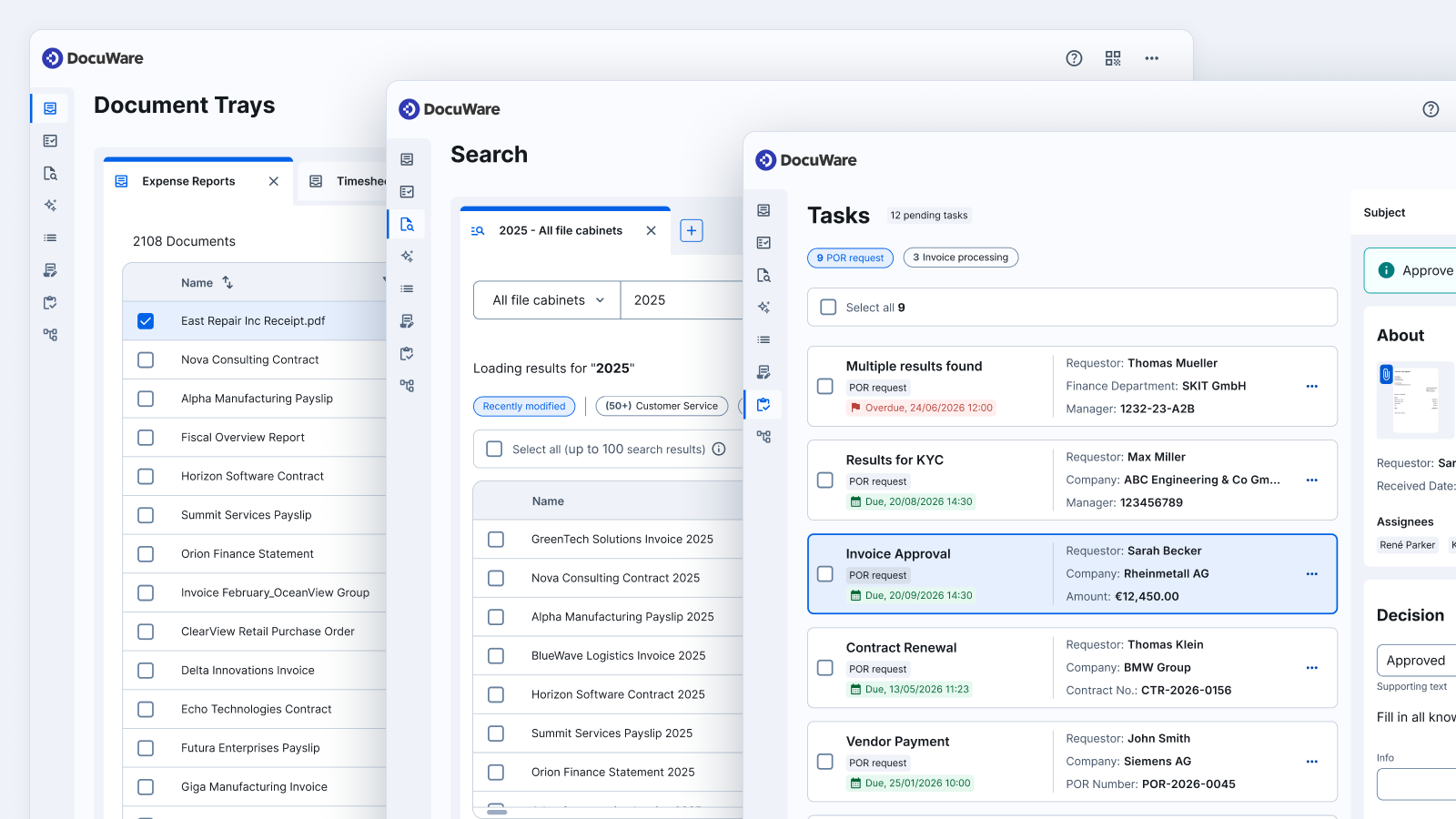
For DocuWare Cloud customers, the update to version 7.15 is much more than just the usual semi-annual update: It includes the new DocuWare. With it, you’ll get:
- A new client with a modern, user-friendly interface allowing you to easily search across all file cabinets and intuitively manage your documents.
- DocuWare Aura, an integrated AI assistant that helps you transform your documents into intelligent knowledge. Summarizing, comparing and analyzing documents in a business context—DocuWare Aura will do all of this for you in just a few seconds.
- For DocuWare IDP, a completely new configuration is available as Early Access. Define IDP flows for processing incoming documents—including splitting, classification, extraction and master data matching—and create GenAI models or models based on your data in DocuWare.
Learn more about the new DocuWare in our announcement article
New features in the Workflow Designer – for Cloud and on-premises
With the automatic arrangement of workflow activities, the different default colors for various activity types, a live preview of workflow notifications while you're still editing and other new features, configuring workflows is now even easier and faster.
.png?width=2551&height=1276&name=Workflow%20(1).png)
The “Arrange automatically” feature is located on the toolbar at the bottom of the workspace
Learn more about these and other updates to the web-based Workflow Designer.
If you have not yet fully transitioned from the Workflow Designer desktop app to the new web-based designer, please plan the transition well in advance.
DocuWare Mobile + Update recommendation for on-premises
Currently, there are two versions of the DocuWare mobile app: the new version and the classic version.
Important information for on-premises customers:
The new mobile app can be used with DocuWare from version 7.10 and above (the pre-requisite is last minor version is installed); it is not compatible with earlier versions. In this regard, we would also like to remind you that support for version 7.9 will end at the end of the month; see the DocuWare Support Lifecycle Policy.
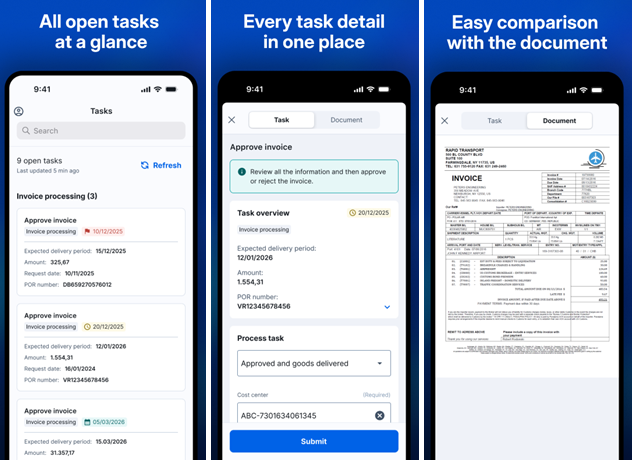
The new app focuses on mobile-specific, on-the-go use cases, simplifying every interaction — from viewing and approving documents to completing workflow tasks in just a few taps
Download the new DocuWare mobile app now: App Store | Google Play
The classic mobile app is still available in the stores, but it is no longer being developed. Therefore, there is a possibility that it may no longer be usable with future iOS or Android versions.
Important preparations for version 7.15 – for DocuWare Cloud
Please keep the following points in mind for a smooth update:
File cabinet permissions vs. dialog: The difference will become visible in the new DocuWare
The new search function and DocuWare Aura search all locations where a user has permissions — independent of search or result dialogs. This is by design, and it’s foundational to the solutions we’re building next. But it also brings an important issue to light: Where access has been managed through dialogs rather than file cabinet permissions, users may now find documents they couldn’t access before — even though the permission model itself hasn’t changed.
Before updating, check to make sure all permissions are configured correctly. For more information, see this article: File cabinet permissions vs. dialogs: getting the difference right.
DocuWare Cloud and single sign-on: New callback URL required
In connection with the new DocuWare, we are also introducing a new version of Identity Service for DocuWare Cloud. If you are using single sign-on (SSO), your administrator must add an additional “callback URL” in your SSO configuration before updating to DocuWare version 7.15. Read this article to find out exactly what to do: Attention Admins: Single Sign-On for DocuWare Cloud.
Information about all features – for Cloud + on-premises
You can find more information about these and all other new features in the DocuWare Knowledge Center in the “news” section.
For DocuWare Version 7.15, as usual, you’ll find application scenarios and benefits for you as a user or administrator. There you’ll also find the technical release notes, including the updated system requirements and other technical changes.
For the new DocuWare, the Knowledge Center offers introductions to the new client, DocuWare Aura and the new IDP configuration.
How to get the DocuWare 7.15 update
If you’re using DocuWare Cloud, you’ll receive the update automatically – no action is needed. Our DocuWare Cloud Team will notify you in advance of the exact timing.
If you’re using an on-premises system, please contact your authorized DocuWare Partner or your DocuWare representative. They will inform you about the new features and advise you on update options.