


DocuWare’s new web-based Workflow Designer makes creating automations even more convenient and will gradually replace the classic desktop app. Find out about the key milestones and how to make the transition to the new solution as easy as possible.
Contents
DocuWare’s web-based Workflow Designer is available since DocuWare version 7.13 (Cloud) and 7.14 (on-premises).
The next milestones
The following steps are planned for both DocuWare Cloud and the on-premises versions of DocuWare:
Starting with DocuWare version 7.15 (fall 2026), new workflows can only be created using the web-based designer. You will still be able to edit your existing workflows in the Workflow Designer desktop app.
Starting with DocuWare version 7.16 (planned for spring 2027), the Workflow Designer desktop app will no longer be included with the product. From then on, workflows can only be created and edited in the browser.
What this means for you: You don’t have to migrate your existing workflows by a specific deadline. They will continue to run reliably and can be migrated to the web-based designer gradually as needed. Migration of an individual process only becomes necessary when you want to make changes to an existing workflow. Nevertheless, we generally recommend migrating your workflows as soon as possible, as support for the Workflow Designer desktop app will be discontinued in the medium term. We will keep you updated on this.
How migration works
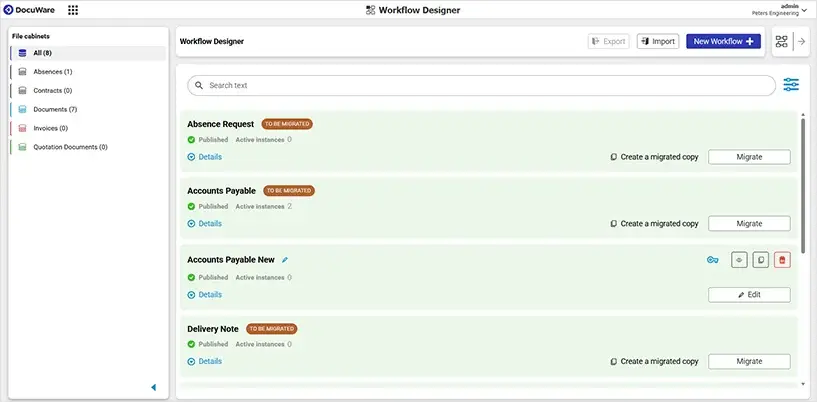
Your existing workflows automatically appear in the web-based designer overview, where they are marked “To be migrated.” You can migrate your workflow with a single click and, if needed, first create a migrated copy for risk-free testing.
Our tip: Start using the web-based designer for new projects now to familiarize yourself with the new way of working. Before migrating, be sure to check for any technical changes (breaking changes) that could affect your workflows so that your processes continue to run as intended.
You can find detailed step-by-step instructions in this Article and in the DocuWare Knowledge Center.