With DocuWare Version 7.13, forms can now be pre-filled – either manually or automatically within workflows. This saves time, reduces errors and enhances collaboration.
Contents:
- Pre-filling forms: Benefits for users
- For admins: Pass values as URL parameters
- In workflows: Pre-filled forms as workflow tasks
- Enabling the pre-fill option for forms
- Availability
Pre-filling forms: Benefits for users
With the introduction of the new pre-filling option for forms, users can now complete forms step by step, save their progress, and finish them at a later time. Additionally, users can effortlessly forward the partially filled forms to colleagues for further processing.
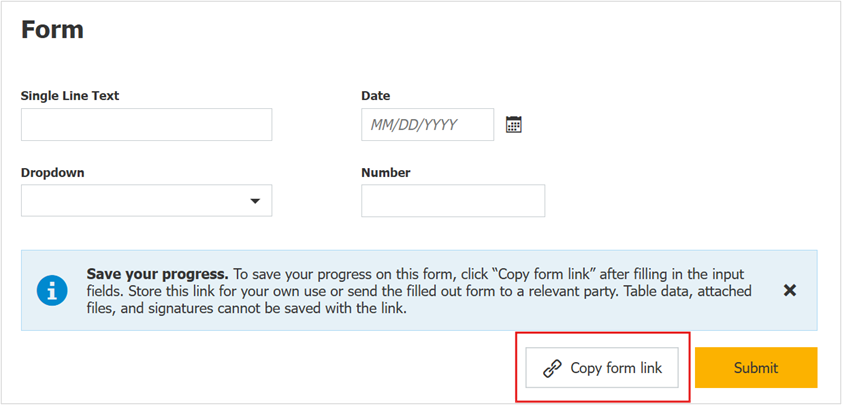
In the web form, there is now a new “Copy form link” button next to “Submit”. Users can save this link locally to continue working on the form later, or send it to a colleague for completion.
For admins: Pass values as URL parameters
As an administrator, you can also pre-fill a form by editing its link and adding field IDs and values as URL parameters. When you share an enhanced link like this within your organization, users only need to fill out the remaining fields, allowing them to complete the form faster.
Detailed instructions on how to edit a URL to pre-fill a form can be found in the Knowledge Center.
In workflows: Pre-filled form as a workflow task
If a workflow includes a task to complete a form, the form can now be automatically filled with data already collected within the workflow. This saves time and prevents inconsistencies.
You’ll find a detailed scenario with configuration steps in this step-by-step guide.
Enabling the pre-fill option for forms
To activate this feature, open Form configuration and navigate to: “Submission tab” > “Pre-fill the Form” section.
 New section in the form configuration for pre-filling forms.
Activate the “Allow the form to be pre-filled” option to enable the feature for the form in general. To allow users to pre-fill the form themselves, also enable the second option “Show ‘Copy form link’ button”.
Availability
- This option is available both for DocuWare Cloud and on-premises customers starting with DocuWare Version 7.13. On-premises users need the DocuWare Forms module license to use forms.
- Pre-filling is not supported for the field types Table, Attach file, and Signature.
- To ensure predefined values remain invisible and uneditable in the URL, configure the corresponding fields as read-only.
Read more articles from the Forms management section.