DocuWare Version 7.13 is here. The highlight: a completely web-based Workflow Designer – designed to make processes even more intuitive and efficient. There’s also good news on the future topic of e-invoices: automated processing of different invoice formats just got a lot easier.
Contents
- DocuWare Cloud with new Workflow Designer – making processes even more intuitive
- E-invoices: Automatic identification for additional formats
- Pre-fill DocuWare forms – in workflows or individually
- Two-step verification for more secure user login
- For on-premises customers: Workflow Analytics API and more
- Information about all features
- How to get the DocuWare 7.13 update
DocuWare Cloud with new Workflow Designer – making processes even more intuitive
Discover the improved ease of use that comes with web-based workflow creation. The new HTML-based Workflow Designer lets you organize and optimize your processes more efficiently than ever. Create, edit and manage your workflows directly in DocuWare Configuration from any browser-enabled device. Boost your productivity with seamlessly integrated workflow management in DocuWare Cloud – anytime, anywhere.
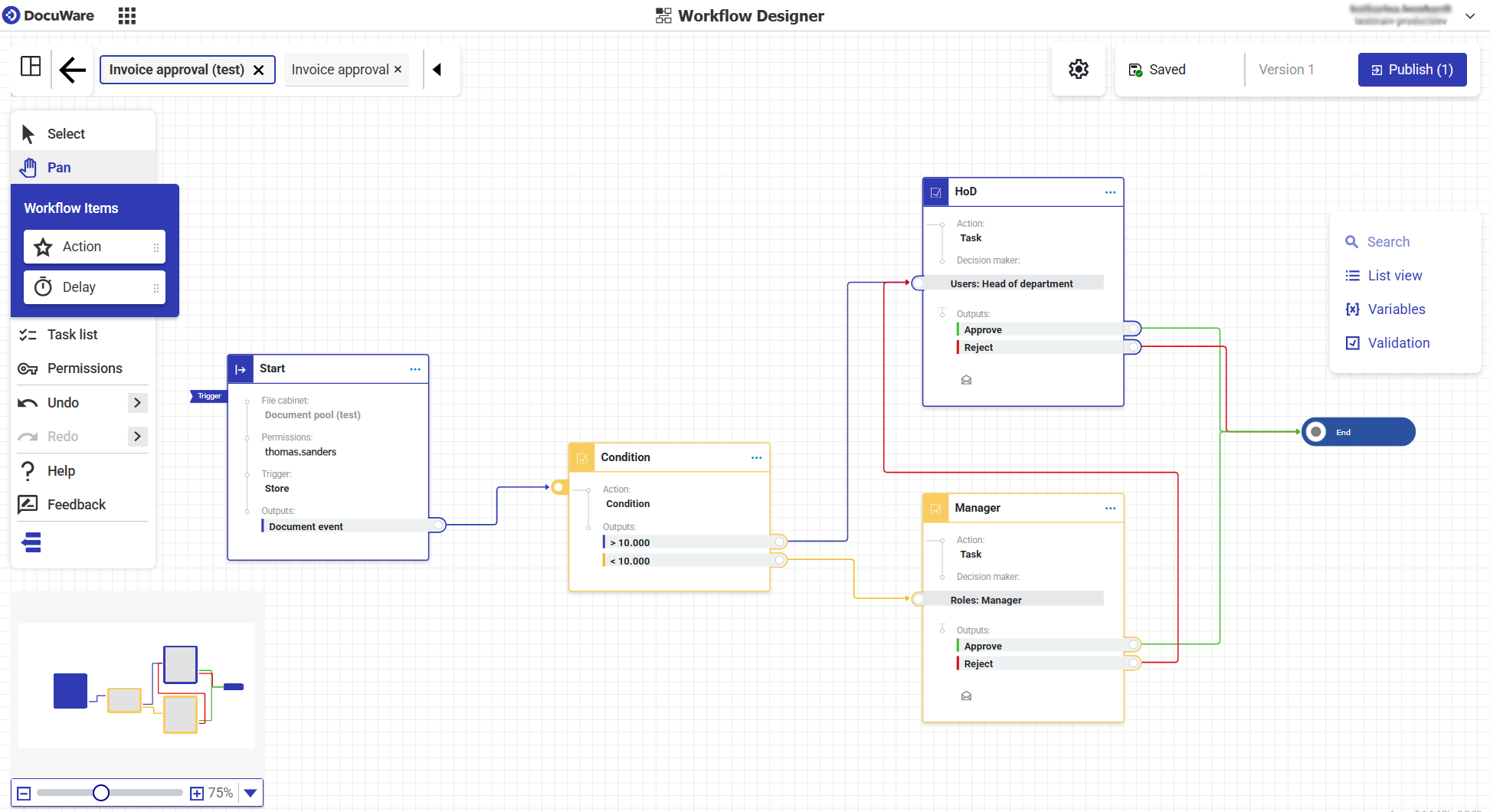
The intuitive workspace of the new Workflow Designer
Your benefits at a glance:
- No desktop app necessary: configure workflows directly in your browser – more flexible and easier than ever before
- Modern and intuitive: redesigned user interface, keyboard shortcuts and updated, clear terminology simplify workflow configuration
- Work faster: duplicate or delete multiple actions at once
- Auto-save: all changes are saved immediately – no risk of losing work
- Undo and redo: delete or reapply changes – correct mistakes quickly without having to start from scratch
- Targeted export: selectively export individual workflows
The new Workflow Designer is initially available for DocuWare Cloud. For on-premises systems, release is planned for spring 2026. The Workflow Designer desktop app will remain available to you at least until then.
E-invoices: Automatic identification for additional formats
The identification of new e-invoice formats is the next step in automation: even non-UBL-based e-invoice formats such as FatturaPA (Italy) or KSeF (Poland) can now also be automatically recognized and processed according to specific configurations. This is particularly useful if you receive all invoices in a universal mailbox.
Pre-fill DocuWare forms – in workflows or individually
Forms can now be pre-filled using URL parameters, supporting various use cases:
- Partially fill out a form and save it to complete and submit later.
- Partially fill out a form and forward it to a colleague for completion.
- As an administrator, pre-fill a form by editing the link and passing field IDs and values as URL parameters.
- Use data already entered in workflows from specific index fields to pre-fill your forms.
 Enable the two new options in the Configuration to allow pre-filling of forms.
Two-step verification for more secure user login
You can now add an additional layer of security to your DocuWare accounts with Two-step Verification (2SV). When activated, users must enter a six-digit one-time password every time they log in. They receive the code via an authentication app on their smartphone, such as Microsoft Authenticator or Duo Mobile.
For on-premises customers: Workflow Analytics API and more
The Workflow Analytics API is now also available for locally installed DocuWare systems, allowing you to analyze business processes in detail. The API delivers structured data that can be transferred directly to Microsoft Power BI (via DocuWare Power BI Connector) or to other analysis and integration solutions.
You’ll also benefit from multiple optimizations in DocuWare Forms as well as user provisioning – the successor to User Synchronization – for on-premises installations.
Information about all features
You’ll find more on these and all other new features in DocuWare Version 7.13 in the DocuWare Knowledge Center under News, including use cases fields and benefits for you as a user or admin.
You’ll also find further security features and changes within DocuWare Configuration.
How to get the DocuWare 7.13 update
If you’re using DocuWare Cloud, you’ll receive the update automatically – no action is required on your part. Our DocuWare Cloud Team will notify you in advance of the exact timing.
If you’re using an on-premises system, please contact your authorized DocuWare Partner or your DocuWare representative. They will inform you about the new features and advise you on update options.
On-premises customers should also be aware of the DocuWare Support Lifecycle Policy. DocuWare Version 7.7 will be supported until the end of October 2025 and Version 7.8 until the end of May 2026. Version 7.8 is also the minimum requirement if you want to update directly to version 7.13. Learn more about the additional benefits of updating.