



Whether you want to scan, print, or open documents from DocuWare using their original applications, Desktop Apps seamlessly connects your local work environment with your file cabinet. Installation takes just a few clicks, so you can get started straight away.
Contents:
Why you need Desktop Apps
With Desktop Apps installed on your computer, you can, for example, scan paper documents directly into the document tray or send them from there or from the file cabinet by email. You can also open and edit documents, such as an Excel spreadsheet, in their native program directly from DocuWare.
To take full advantage of features like Smart Connect or DocuWare Connect to Outlook, the corresponding Desktop App must be installed.
The following Desktop Apps are available:
- Connect to Outlook: Save emails directly from Outlook to DocuWare.
- Edit & Send: Edit or send documents straight from DocuWare.
- Import: Automatically import documents from monitored folders.
- Printer: Print and store documents as PDFs from any application.
- Scan: Scan and save documents directly to a document tray or file cabinet.
- Smart Connect: View related documents from other applications, such as your ERP system, within DocuWare.
- Windows Explorer Client: Integrate DocuWare into the Windows File Explorer.
- Workflow Designer for Workflow Manager: Create and edit workflows.
Installation made easy
Installing the DocuWare Desktop Apps is quick and straightforward via the DocuWare Client:
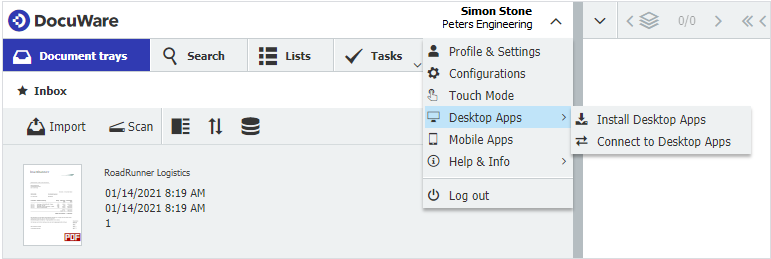
1. Click on your user name to open the main menu.
2. Select Desktop Apps > Install Desktop Apps. The DocuWare Desktop Apps setup file will download to your Downloads folder.
3. Double-click the file to start the setup.
4. Select the apps you need from the list above.
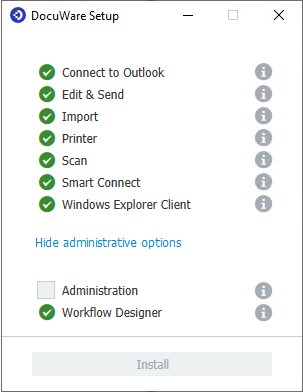
5. Follow the installation instructions.
6. Once the installation is complete, connect the Desktop Apps to your DocuWare system by going to Desktop Apps > Connect Desktop Apps from the main menu in the Client.
And that’s it! With Desktop Apps installed, you can take full advantage of powerful features to streamline and enhance your daily work.
Learn more about practical use cases in DocuWare.