



Many companies are already working with the new Outlook and using the DocuWare for Outlook add-in for archiving. You can also conveniently store e-invoices and immediately use invoice data in workflows and analysis tools.
Contents
- Process a wide variety of e-invoice formats
- Activating automatic processing
- The difference between DocuWare for Outlook add-in and Connect to Outlook
- How DocuWare supports you with the Microsoft changes
The future belongs to the new Outlook for Windows online, as Microsoft is phasing out its classic, locally installed Outlook client in several stages (more on this below). For the newly introduced Outlook, DocuWare offers an add-in that supports you with tasks such as automated processing of emailed e-invoices.
Process a wide variety of e-invoice formats
With the latest update to the DocuWare Outlook add-in, you can process e-invoices in all standard formats via the new Outlook, including for example XRechnung from Germany, FatturaPA from Italy or KSeF from Poland.
Each format requires just one document processing configuration, which you can set up in the DocuWare Configuration interface (Learn More).
Activating automatic processing
When an e-invoice arrives, simply select the appropriate processing configuration during archiving.
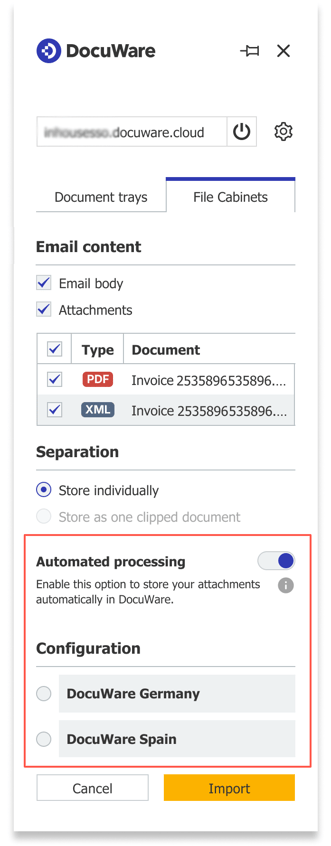
To access the configuration options, you must first activate the “Automatic Processing” option in the Add-In. Soon, the Add-In will be able to automatically identify the format and select the right configuration for you. You'll find out about the change here.
The difference between DocuWare for Outlook Add-In and Connect to Outlook
DocuWare offers two different Outlook integrations:
– DocuWare Connect to Outlook for classic Outlook
– DocuWare for Outlook Add-In for the new Outlook
Unlike Connect to Outlook (a Desktop App), the DocuWare for Outlook Add-In is compatible with Microsoft's web and online version in all browsers, including iOS. It can be added to Outlook accounts free of charge from the Add-Ins section of the Microsoft Store.
How DocuWare supports you with the Microsoft changes
Since Microsoft is planning to completely replace classic Outlook in the long term, DocuWare is focusing its development efforts on the DocuWare for Outlook Add-In. Currently, the add-in is only available for DocuWare Cloud, but will soon also be offered for on-premises DocuWare systems.
If you’re using an on-premises DocuWare system, you can continue using classic Outlook to archive emails via Connect to Outlook. To postpone the forced transition to the new Outlook, we recommend using Microsoft’s opt-out option. DocuWare is continuously expanding the features of the Outlook Add-In – enhancing the value it provides to your organization.