


Do you receive both PDF invoices and e-invoices in your email inbox? DocuWare can easily manage these various types of attachments. Simply combine e-invoice processing with DocuWare IDP. All documents are indexed in one go, and the data is immediately available for workflows or external tools.
Contents
- Automatic identification of e-invoices
- Equipped for PDF invoices with DocuWare IDP
- Email: Combine configurations
Several configurations can be linked to process the different types of invoices that you receive via e-mail. This allows you to process all formats at once: E-invoices based on XML data and PDF invoices using DocuWare IDP.
Automatic identification of e-invoices
Let's say your company receives e-invoices from Germany, Spain, Italy and Poland. That means you need to handle XRechnung, FacturaE, FatturaPA, and KseF formats. Since the first two formats are UBL-based, you can create a single document processing configuration for them. For the Italian and Polish formats, you set up separate configurations.
Based on these configurations, all incoming e-invoices are processed automatically. DocuWare automatically identifies all e-invoice formats based on UBL/CII as well as all other common XML e-invoice formats. You can find out how to set this up easily in the DocuWare Knowledge Center.
Equipped for PDF invoices with DocuWare IDP
PDF invoices you receive by email can often contain highly complex data. Extracting this data with DocuWare Intelligent Document Processing (IDP) offers significant benefits. For example, you can also extract data from scanned documents such as delivery notes, which sometimes arrive crumpled and require special recognition capabilities. DocuWare Intelligent Document Processing (IDP) provides these critical advantages here, ensuring accurate data extraction and efficient document management.
Email: Combine configurations
To make sure the right configuration is automatically applied to both E-Invoices and PDF documents, set this up in DocuWare under general email configuration.
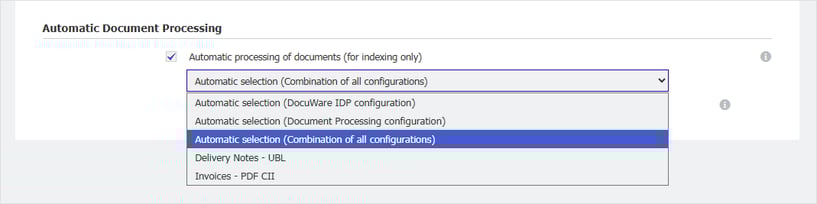
Open a configuration and select Import options. Enable Automatic document processing (only for indexing) and select Automatic selection (combination of all configurations).
The combined automatic identification of e-invoices (standard UBL/CII) and PDF invoices is available with DocuWare starting from version 7.12. If you also use e-invoice formats that aren’t based on UBL/CII, such as the Polish KSeF or Italy’s FatturaPA, you’ll need DocuWare Version 7.13. If you’re working with an on-premises DocuWare system, the Connect to Mail license is also required.
Learn more about the many features of DocuWare IDP.