



Automation delivers the greatest value when its results are reliable. Therefore, validation is an important component of Intelligent Document Processing, especially when the AI cannot make a confident decision. The new IDP Validation feature in the DocuWare web client makes this quality assurance step easier.
Users can review and validate documents directly within their familiar working environment, without having to switch between different applications. This makes the entire workflow more efficient and ensures that only reliable results are passed on to downstream processes.
Contents
- Validation with DocuWare IDP: understanding the need
- Use case: preventing errors in invoice approval
- IDP validation directly in the DocuWare web client
- How the new process works
- Validation: a smart safety net, only when needed
- Availability
Validation with DocuWare IDP: understanding the need
DocuWare IDP combines artificial intelligence and automation to understand document content, identify document types and extract relevant information. With DocuWare IDP, organizations can automate processes such as document separation, classification and data extraction while reducing manual effort. Master Data Matching automatically compares extracted information with existing master data and supports accurate and consistent processing.
Even highly automated processes can produce unclear or low-confidence results. Poor scan quality, unusual document formats, or complex documents may affect document separation, classification, or data extraction. Incorrect results can affect downstream processes such as accounting or approval workflows. Users therefore need an efficient way to review and correct results without unnecessarily interrupting automated processes.
This is where IDP Validation comes in. Through targeted human review, users can review and confirm results when their insight is most valuable. The confidence score indicates how confident IDP is in a processing result and can help determine when manual review is required. This helps ensure high standards of accuracy and reliability while keeping manual effort to a minimum. If an invoice falls below the defined confidence threshold, a user can review the supplier, invoice number and amount before the document enters the approval process. This helps prevent errors without sacrificing the benefits of automated processing.
Use case: preventing errors in invoice approval
Accounts payable teams often process a high volume of invoices that are automatically captured and prepared for further processing. While most invoices can be processed without intervention, individual documents may contain unclear or unreliable information—for example, when the scan quality is poor. If these details are not identified before the invoice enters the approval process, incorrect information can lead to delays or additional manual work.
With IDP Validation, invoices that require additional review can be identified before they continue through the workflow. A user can check the relevant invoice information and confirm that the results are correct before the document is passed on to the approval process. This allows the team to intervene only where necessary instead of manually checking every invoice.
Result: By catching inaccuracies upfront, IDP Validation streamlines the approval workflow, significantly reducing the amount of manual rework and dispute resolution needed after errors are discovered. This proactive review minimizes approval hold-ups, accelerates payment cycles and enables AP teams to maintain a high level of accuracy without sacrificing efficiency. Ultimately, invoice approvals become more reliable and less labor-intensive, freeing up valuable team resources to focus on higher-value tasks.
IDP validation directly in the DocuWare web client
Previously, validations could only be performed within the DocuWare IDP configuration or DocuWare IDP monitoring environment. As a result, users had to leave their familiar working environment to review and approve documents.
With the new IDP Validation feature, this process is now integrated directly into the DocuWare web client. This eliminates unnecessary media disruptions and makes the entire validation process significantly simpler and more efficient. Users can stay within the familiar interface they work with every day and perform required reviews directly there. This saves time and improves collaboration between business departments and administrators.
The validation interface is seamlessly embedded into the web client while providing the same range of functions that users are already familiar with from the existing DocuWare IDP interface.
How the new process works
Whenever a manual confirmation is required for a processing step, the document appears in the IDP Validations area in the DocuWare web client
This area displays all documents that are waiting for validation.
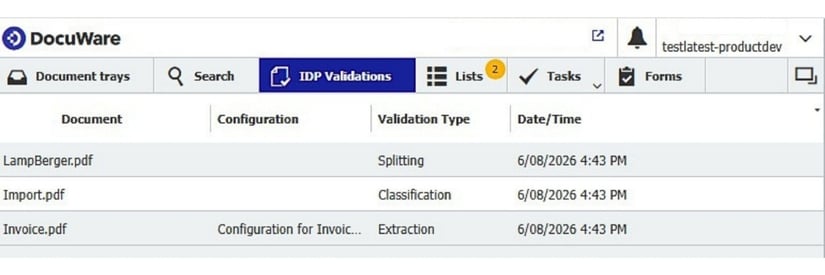
By clicking on a document, the validation view opens directly within the web client. Users can review the suggested results and correct or confirm them as needed.
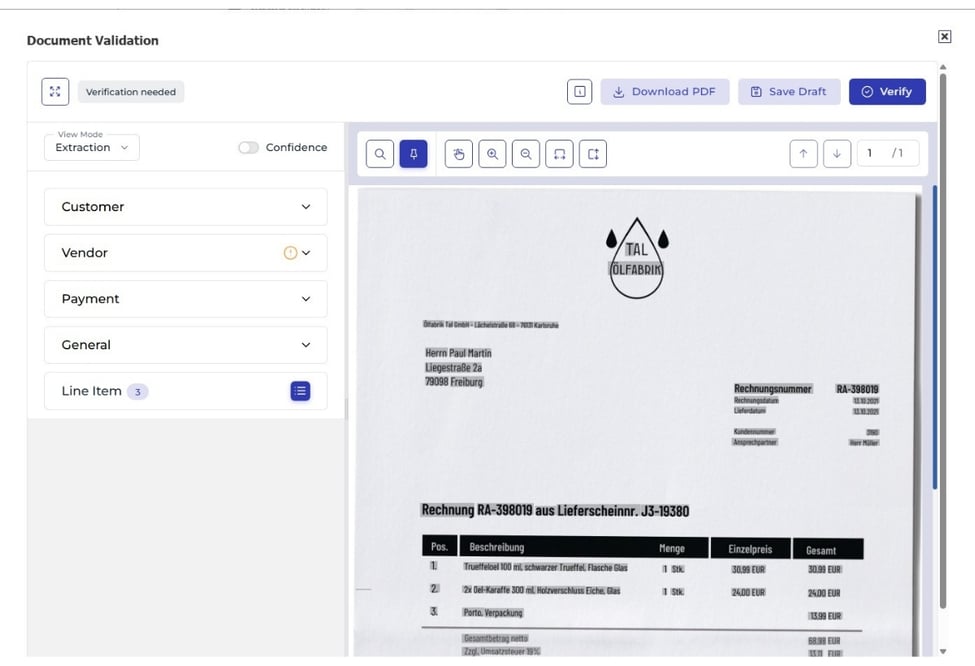
Validation can be performed for all three key processing steps:
- Document Splitting – Review of the automatic document separation
- Document Classification – Verification of the detected document type
- Data Extraction – Review of the extracted information
Once validation has been completed successfully, the corresponding item is automatically removed from the list. This allows users to keep track of pending reviews at all times and process them efficiently.
Please note that only users with the “Configure DocuWare IDP” right can access the IDP Validation area and use the new IDP Validation feature.
Validation: a smart safety net, only when needed
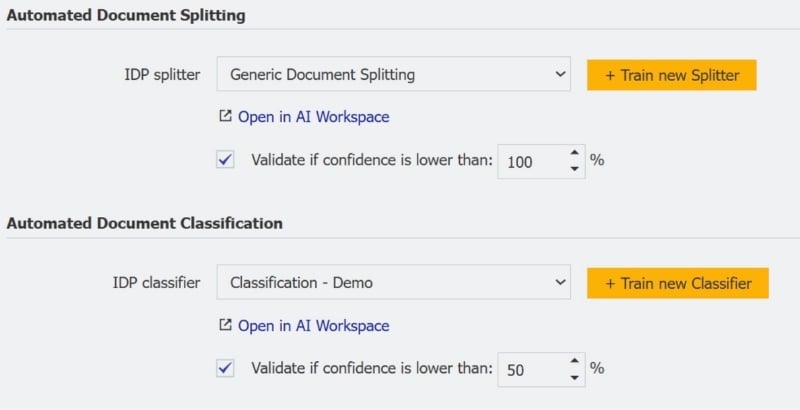
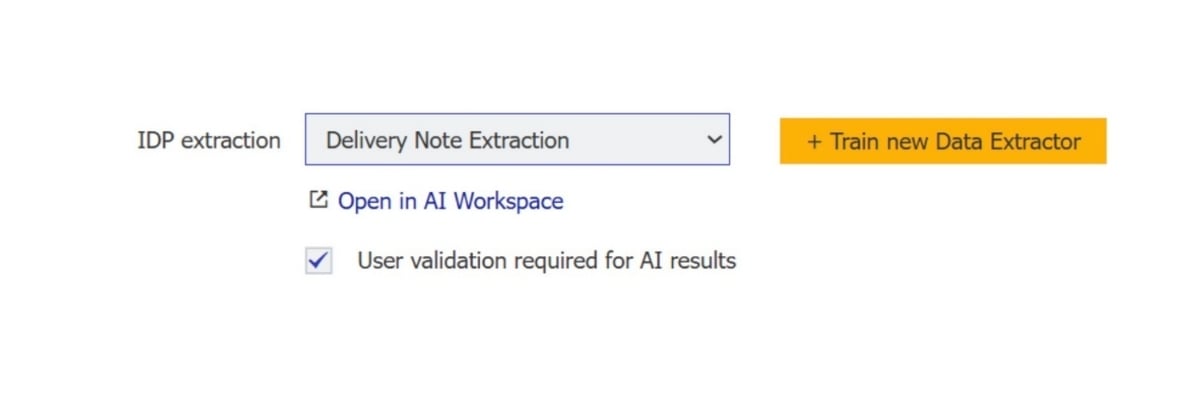
Validation catches documents that require a closer look while routine documents continue to be processed automatically. In the DocuWare IDP Configuration, you have full control over whether validation is needed for each processing step. For document splitting and classification, you can define confidence thresholds that determine when validation should be triggered.
When the system does not reach the defined confidence threshold, the document is automatically sent for review. This targeted approach ensures that you focus your expertise on the cases where it adds the most value, while routine documents continue to flow automatically through the process. It helps prevent important details from being overlooked without adding unnecessary manual effort to automated processing.
Availability
IDP Validation within the DocuWare web client has already been released for DocuWare Cloud. For on-premises installations, the feature is not yet planned.