
Business documents such as contract templates, price lists, and work instructions require frequent updates. With DocuWare, you can keep track of all the different versions: The most recent version is always directly accessible, and all previous ones are clearly listed in the version history.
Want to ensure different versions of a contract can be viewed separately while still being archived together? Are you frustrated by multiple documents with proposed changes but unsure who made them? Ask your administrator about DocuWare's automatic version management. It provides an immediate overview and can be enabled for specific file cabinets at no additional licensing cost.
Content
- Document + Change = Version
- Automated check-out/check-in
- 5 reasons for version management in a nutshell
- Notes for your admin
Document + Change = Version
First things first: A traditional Windows file system overwrites an old document when changes are made. If the changes are instead saved in separate documents with a new abbreviation, then you’ll see a whole pile of files accumulate – which gets more and more confusing over time.
When you use the full power of DocuWare, you‘ll never have this problem again. Once a contract, price list or other document is stored in a file cabinet, all editing steps will be saved together with the document and stored as a new version with a unique number. Every change will be tracked in the version history for years to come. Plus older document versions are easy to see.
Automated check-out/check-in
When an employee opens a document from DocuWare in its native program (e.g., Word), the file is locked (checked out) to prevent simultaneous edits. Others can only view it until changes are saved and the document is checked in, which creates a new version automatically.
5 reasons for version management in a nutshell
Here's why your admin should activate automatic version management – especially for any file cabinet containing contracts or other documents that are regularly edited.
- No more file chaos: There is only ONE current document. When you search for the document, only this version will be displayed at first.
- All editing steps are stored with the document – no need to save as a new version again.
- Who made changes can be viewed by every authorized employee. Right-click on the context menu of the document in the result list and select Document History.
- The current status of a document can be viewed at any time.
- Revision security and traceability is guaranteed since all changes are tracked.
Notes for your admin
Automatic version management needs to be activated in each file cabinet’s configuration – there it only takes a single click. It’s available in DocuWare Cloud as well as in locally installed DocuWare versions and does not require any additional licenses.
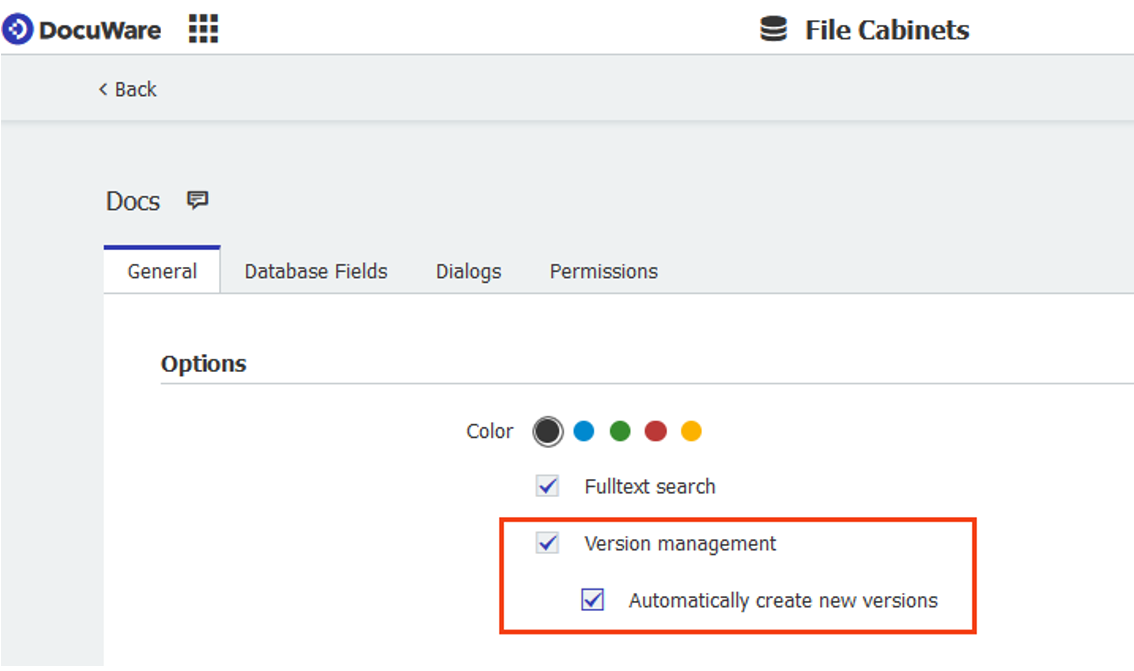
To maintain stringent consistency within a file cabinet, this feature cannot be deactivated again at a later point in time. Therefore, do not use it for test purposes in a production file cabinet.
For more information on version management please check out this Knowledge Center article.