Explore DocuWare pricing – cloud and on-premises plans, key cost factors, and how to request a custom quote.
Choosing a document management system is a strategic decision. It shapes how your teams process invoices, onboard employees, manage contracts, and stay compliant.
Pricing is a critical part of that decision – and we believe it should be transparent.
DocuWare pricing depends on several factors:
- how many people need access
- how much storage your organization requires
- which capabilities matter most to your workflows.
This page breaks down each of those factors so you can have a more productive conversation with your DocuWare partner or sales representative, to build a solution that eliminates manual bottlenecks, improves visibility, and scales with your business.
Depending on plan size, user type, and organizational needs, DocuWare Cloud typically costs between $30 and $125+ per user per month. Your DocuWare rep will work with you to build a solution tailored to your team's specific requirements and budget.
What Factors Influence Document Management Software Pricing?
Before diving into DocuWare-specific pricing, it helps to understand the factors that drive document management software pricing across the market. Regardless of vendor, a few key variables shape what you'll pay.

Storage capacity
The volume of documents, images, and files your organization stores affects cost, and not all storage is created equal. Pricing varies depending on the provider's infrastructure performance, security standards, and data redundancy.
DocuWare takes a security-first approach to storage, with multiple layers of backup and redundancy built into every plan. This means your documents are protected against data loss and can be rapidly restored, a level of protection that some providers charge extra for or don't offer at all.
Number of users
The number of people who need access to your document management system directly impacts cost, but equally important is the type of access each person requires. Not every user needs full administrative capabilities.
DocuWare offers multiple license types to help organizations right-size their investment:
-
Full Named Users: Complete access to document management, workflow configuration, and administrative capabilities.
-
Workflow Users: Limited functionality access for completing workflow tasks, submitting forms, and read-only document viewing.
This tiered approach means you only pay for the level of access each team member actually needs, extending DocuWare across departments without over-licensing. Some providers charge a flat per-user rate regardless of how someone uses the system; DocuWare gives you more control over cost.
Features and Funcationality
The breadth and sophistication of features a DMS offers plays a significant role in shaping its pricing structure. Advanced capabilities like workflow automation and AI-powered document processing are often reserved for higher-priced subscription tiers with many vendors.
Every DocuWare Cloud plan includes a robust set of core features — including Intelligent Indexing, Workflow Manager, and Forms. Specialized capabilities such as SAP integration, digital signatures, and Intelligent Document Processing are available as add-on modules, giving organizations the flexibility to build a solution tailored to their needs.
Backup and Data Recovery
Backup capabilities and data recovery options are critical, though often overlooked, components of DMS pricing. The frequency, comprehensiveness, and reliability of backups vary between providers, and some charge extra for anything beyond basic protection.
DocuWare provides robust backup solutions as part of its standard service, ensuring data is backed up regularly and can be quickly restored in the event of data loss or system failure. This is included, not upsold.
Monthly payments vs annual payments
The length of your contract and your payment structure affect overall pricing. DocuWare, like most cloud providers, offers flexible payment options and incentives for longer-term commitments. Annual prepayment simplifies budget planning and typically offers more favorable pricing than monthly billing.
Ready to discuss your specific needs? See how DocuWare can secure your documents, streamline workflows, and boost productivity.

Schedule a consultation with a DocuWare expert.
See how to secure your documents, set up digital workflow and kick your productivity to a new level.
DocuWare Cloud vs. On-Premises: How Licensing Differs
DocuWare is available as both a cloud and on-premises system. In recent years, over 80% of new DocuWare customers globally have chosen DocuWare Cloud as their digital transformation platform. In the United States, that number exceeds 90%.
Both versions offer the same core document management and workflow automation functionality. For the end user, the primary differences are the URL in the browser and how the software is licensed:
-
DocuWare Cloud uses an annual subscription model, similar to other SaaS platforms. Monthly and annual costs are significantly lower than an on-premises deployment, with no infrastructure to manage.
-
DocuWare On-Premises uses perpetual ownership licenses. The customer purchases licenses outright and hosts the system on their own servers. The upfront investment is higher, but there are no recurring subscription fees beyond optional annual support.
For a deeper comparison, visit: Cloud vs. On-Premises Deployment →
DocuWare Cloud Pricing Overview
DocuWare Cloud is sold in tiered plans that scale by the number of named users and included storage. Per-user costs typically range from $30 to $125+ per month, depending on the plan tier, user type, and scale of your implementation. Your DocuWare representative will help you identify the right configuration based on your team's workflows and document volume.
Typically, the total annual cost of a DocuWare Cloud system is less than the salary of a single employee, yet it can automate processes that would otherwise consume dozens of hours per week across your team. A better way to frame the value: what could your employees accomplish if they had 2–5 extra hours every day?
If your document processing needs are minimal,say fewer than 20 documents per month, DocuWare may be more capability than you need. But for organizations processing hundreds or thousands of documents monthly, the ROI becomes compelling very quickly.
Cloud Plan Tiers
DocuWare Cloud offers four standard plan tiers. Each can be extended with additional users and storage at any time.
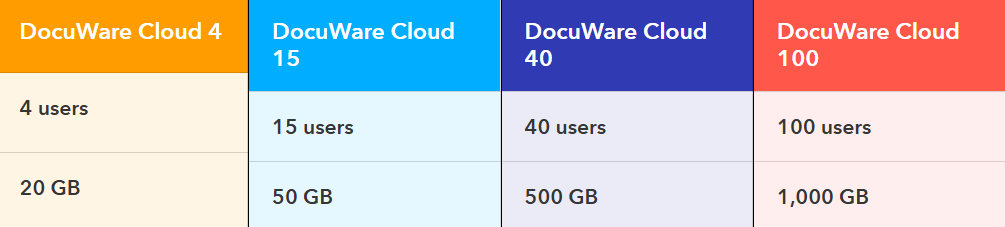
Users and storage can be flexibly extended at any time. Request a consultation, and we'll connect you with the right expert for your organization.
Storage
Each DocuWare Cloud plan includes storage for your organization's documents. As your needs grow, storage can be expanded at any time, there's no hard cap that limits your ability to scale. DocuWare is built to adapt to your business, whether you're managing thousands of documents or millions.
Learn more about what's included with DocuWare Cloud storage →
Add-On Modules
DocuWare offers specialized add-on modules designed to extend the platform's capabilities for specific use cases. Each add-on is priced separately on a monthly basis, allowing you to customize your system to match your needs and your budget.
Connect to SAP
Seamless integration with SAP systems. Access, store, and manage documents directly within SAP transactions, keeping your ERP and document management data in sync.
Digital Signatures
Secure, legally binding electronic signatures available in volume-based packages tailored to different organizational needs. Sign documents electronically while maintaining full authenticity and audit trails.
Intelligent Document Processing (IDP)
AI and machine learning–powered automation for extracting, interpreting, and classifying data from documents. IDP handles invoices, purchase orders, contracts, and more, reducing manual data entry and accelerating document-driven workflows.
Ready to see DocuWare in Action?
Get a personalized demo and see how DocuWare can streamline your document workflows – from invoice processing to HR onboarding to contract management and more.
