
How Much Does DocuWare Cost?

In this series of articles, we want to answer some important questions: what does DocuWare cost and how does it compare to other pricing models on the market? In an age where information is power, the right document management system (DMS) can be the cornerstone of a business’s efficiency and data management strategy. As more companies migrate to cloud-based solutions, understanding the pricing of a cloud DMS has become crucial. This guide aims to demystify the costs associated with cloud-based document management systems. Let’s start with the factors that influence pricing.
check

Storage capacity

Storage capacity is one of the most significant factors affecting cloud DMS pricing. The more storage capacity you require, the higher the cost. Cloud DMS providers typically charge based on the amount of storage you use, and the pricing varies depending on the provider, performance (speed), security and redundancy.
check

Number of users

The number of users who will be using the cloud DMS is another factor that impacts pricing. Some providers charge per user, while others charge a flat fee for a specific number of users. Pricing often scales with the number of users. This can range from a few employees in a small business to hundreds in a medium-sized company.
check

Features

The assortment and complexity of features offered by cloud DMS providers play a significant role in shaping the pricing structure. Different vendors offer varying features and certain functionalities may come at an additional cost. Advanced features such as workflow automation and AI capabilities are often only available at more expensive subscription levels. However, some providers, such as DocuWare, adopt an all-in subscription model where all features are included in all subscription types. In these models, the primary pricing differentiators are the number of users and the amount of storage provided. This approach simplifies the decision-making process for businesses, allowing them to focus more on scaling users and storage to meet their needs.
check

Backup levels

Backup capabilities and data recovery options are critical components of cloud DMS pricing. The frequency, comprehensiveness and reliability of backups can vary between providers, affecting the overall cost. Regular and secure backups ensure data integrity and a rapid recovery in case of data loss or system failure. Some cloud DMS providers may offer no or basic backup options as part of their standard pricing, while more advanced or frequent backup solutions could be available at an additional cost. For instance, DocuWare provides robust backup solutions as part of its service, ensuring that data is backed up regularly and can be quickly restored if necessary.

Read more in this article.
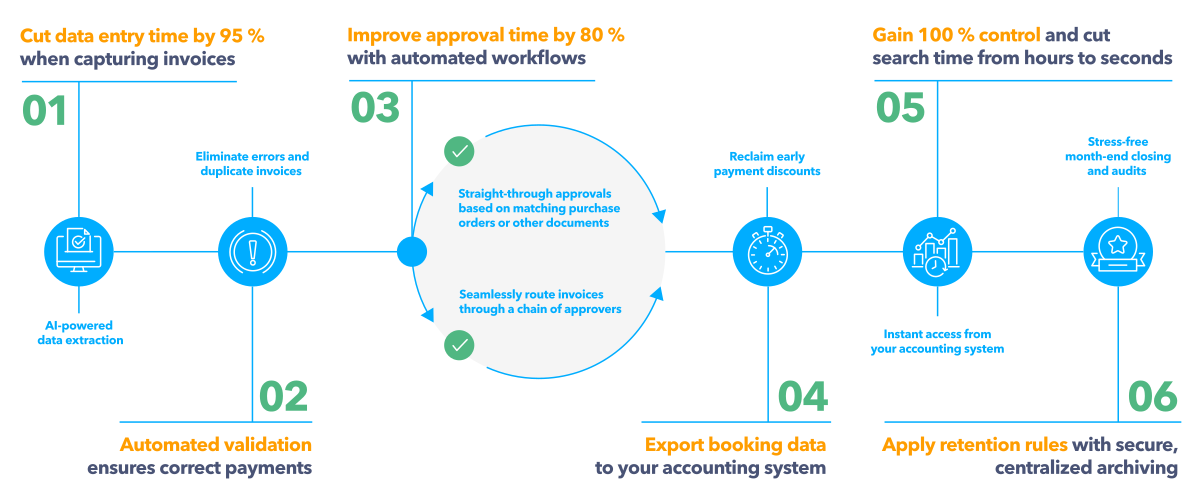
US-DW_IP-ROI-Infographic-landscape-v2


check

Monthly payments vs annual payments

The length of the contract and the payment structure are crucial factors that can affect the overall pricing. Many cloud DMS providers, including DocuWare, offer flexible payment options and incentives for longer-term commitments. Customers who choose to pay for 12 months or more in advance benefit from a more favourable pricing structure. This not only provides a cost-saving opportunity, but also simplifies budget planning for businesses.
docuware-our-focus

Schedule a meeting with a DocuWare expert to discuss your budgetary quote.

See how to secure your documents, set up digital workflow and kick your productivity to a new level.

Get your DocuWare quote

Part II: DocuWare cloud vs. on-premises licensing

DocuWare is offered both as cloud and on-premises system. In 2023, over 80% of new DocuWare Customers opted for DocuWare Cloud as their digital transformation platform. In some countries, such as UK, Spain and US, more than 90% chose DocuWare Cloud.

For more information on cloud vs on-premises implementations click the link below:
https://start.docuware.com/cloud-on-premises-hybrid-deployment

DocuWare offers the same features in the cloud and server version, so for both all document management and workflow automation functions are available. For the end user, the only differences between the two versions are the address in the web browser and the way it is licensed. In the cloud, the customer pays an annual subscription fee, like Netflix. As a result, the monthly and annual costs are significantly lower than with the server version. In the server version, the customer purchases ownership licenses. The licenses and modules selected in the server version affect the price and the set of features available.

DocuWare cloud pricing

The pricing for DocuWare Cloud ranges from £10 to £60 per user per month, with variations depending on the specific functionalities required and the scale of implementation. Typically, the cost of the whole system is significantly less than the salary of a single employee, yet it has the capability to perform tasks equivalent to the work of hundreds of people. A better way to consider the impact on the business is to determine what employees could do for the business if they had 2-5 hours more per day (depending on time-based return on investment (ROI)).

However, it's important to weigh up the benefits and ROI when considering DocuWare. If your document processing needs are minimal, say only 20 documents per month, the investment might not be as beneficial. DocuWare offers a variety of packages to meet different business needs, allowing you to tailor your document management approach to meet your company's specific needs and budget.
DW 2026-07-06 105918

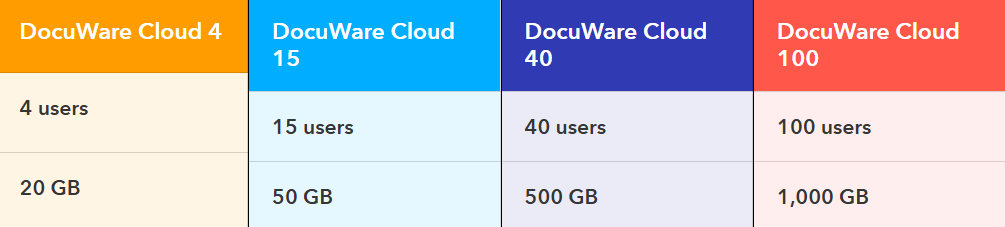
Every DocuWare Cloud plan provides the complete feature set, including Intelligent Indexing, Workflow Manager, Forms and more.

Storage and Users can be flexibly extended at any time.


Part II: DocuWare cloud vs. on-premises licensing

DocuWare is offered both as cloud and on-premises system. In 2023, over 80% of new DocuWare Customers opted for DocuWare Cloud as their digital transformation platform. In some countries, such as UK, Spain and US, more than 90% chose DocuWare Cloud.

For more information on cloud vs on-premises implementations click the link below:
https://start.docuware.com/cloud-on-premises-hybrid-deployment

DocuWare offers the same features in the cloud and server version, so for both all document management and workflow automation functions are available. For the end user, the only differences between the two versions are the address in the web browser and the way it is licensed. In the cloud, the customer pays an annual subscription fee, like Netflix. As a result, the monthly and annual costs are significantly lower than with the server version. In the server version, the customer purchases ownership licenses. The licenses and modules selected in the server version affect the price and the set of features available.

What does the DocuWare cloud price depend on?

Number of named users:

Named Client license, DocuWare software may be used by a designated user within the end-user organization. Pricing for full named users starts at £57 per user and goes down to £20 per user on a sliding scale. Enterprise customers with single use cases can contact their DocuWare Partner for customised solutions.

Number of workflow users:

Workflow User Licenses are Named Licenses with limited functionality for completing workflow tasks, saving forms and read-only access to DocuWare. These licenses are sold in packs of 5. Each pack costs £46 per month. So, a single license is priced at £9.20.

Storage:

Each subscription comes with storage space for your organization. You can purchase more storage at any time.

Part III: Price of implementation

Understanding the cost of implementing DocuWare is crucial for businesses considering a digital transformation of their document management processes. The implementation of DocuWare typically takes place in five distinct stages, each contributing to the overall cost.

Stages of the implementation

The implementation process is broken down into the following stages:

  1. Workshop:

    • Duration: 2-5 days.

    • Objectives:

      • Set project goals and define problems to be solved.

      • Analyse current processes and suggest improvements.

      • Assess competencies and verify DocuWare as the right partner for digital transformation.

      • Conduct simple configurations to demonstrate solution capabilities.

    • Outcomes:

      • An analytical note outlining the scope of work.

      • A detailed valuation of implementation services.

      • A preliminary project implementation schedule.

  2. Implementation:

    • Follows the workshop stage, based on the defined scope of work.

  3. Training:

    • Ensures that users are proficient in using the DocuWare system.

  4. Go-live:

    • The system goes live and becomes operational.

  5. Post implementation support:

    • Ongoing support after the system is live.

Pricing details

Our prices are calculated to be cost-effective even for small and medium-sized businesses. Our customers include companies with as few as a dozen employees. By implementing DocuWare, even small ones can optimise their processes and increase the efficiency of their teams. Thanks to workflows, small and medium-sized companies can scale their business and handle larger volumes of purchase invoices, orders and sales invoices without having to hire additional people. If you want to know the exact price of the workshops, schedule a free discovery call and tell us about the problem you are facing and we will tell you if and how we can help.

DocuWare offers two pricing models for onboarding, training and go-live:

Fixed price approach: suitable for projects with a clearly defined scope.

Pros:

Cons:

Budget certainty: provides a clear, up-front cost, which simplifies budgeting and financial planning

Less flexibility: changes to the project scope can be challenging to accommodate without renegotiating the contract.
Risk mitigation: reduces the risk of escalating costs as the price is agreed in advance.
Potential for oversimplification: the initial project scope may overlook certain complexities, leading to inadequate solutions.
Simplified project management: easier to manage as the scope and deliverables are clearly defined from the start.

Time & Material (T&M) approach: optimal for projects where defining the scope is difficult or where flexibility is needed. 

Pros:

Cons:

Flexibility: allows scope and deliverables to be adjusted as the project progresses.

Budget uncertainty: the final cost can be unpredictable, making financial planning more challenging.
Adaptability: more suitable for complex projects where requirements may evolve over time. Potential for cost overruns: without a fixed price, there is a risk of the project becoming more expensive than initially anticipated.
Transparency: clients pay for the actual work done, which can foster a sense of fairness and transparency.