


I have an ERP System, why do I need DocuWare?
How Much Does DocuWare Cost?
How to Decide Between On-Premises and Cloud?
Does DocuWare Justify the Cost? A Comprehensive Perspective on ROI
What is the Difference between Purchase-to-Pay and Invoice Processing?
Can DocuWare Automate 3-Way Matching?
How can DocuWare Help with Fraudulent and Duplicate Invoices?
What Approval Options are Available in the DocuWare Workflow?
How Long Does It Take to Implement DocuWare?
What Processes Can I Automate With DocuWare?
How can DocuWare Help with Fraudulent and Duplicate Invoices?
Why are duplicate and fraudulent invoices an issue for organisations?
Duplicate and fraudulent invoices are a significant issue for organisations for a number of reasons:
- Financial loss: The most immediate impact of duplicate and fraudulent invoices is financial loss. Paying an invoice twice due to duplication or paying out on a fraudulent claim, means the organisation is losing money that could be allocated to other areas of the business.
- Resource drain: Identifying and correcting issues caused by duplicate or fraudulent invoices requires staff to invest time and effort that could be better spent on other tasks. This is not only a financial drain, but also a productivity one.
- Internal processes: Duplicate invoices can reveal weaknesses in an organisation's internal controls and processes. It indicates that there may not be adequate checks and balances in place to prevent the same invoice from being processed multiple times.
- Supplier relationships: Duplicates can cause confusion and generate mistrust between an organisation and its suppliers. Suppliers may become suspicious if they are constantly contacted about invoices that have already been paid, potentially harming business relationships.
- Audit and compliance issues: Duplicates and fraud can cause severe compliance issues. During audits, these problems can lead to significant findings that require remediation and, potentially, to penalties if they indicate a systemic failure in financial controls.
- Fraudulent activity detection: Fraudulent invoices can be part of larger schemes, such as internal fraud by employees or external fraud by parties posing as legitimate vendors. These activities can be complex to detect and may indicate serious security weaknesses.
- Budgeting and forecasting: Duplicates and fraud distort the accuracy of financial records, resulting in unreliable data. This inaccuracy can have a cascading effect on budgeting, forecasting and financial decision-making.
- Reputation damage: When duplicate and fraudulent invoices become public, especially if they are frequent or involve large sums of money, they can damage an organisation's reputation and shake the confidence of investors and customers.
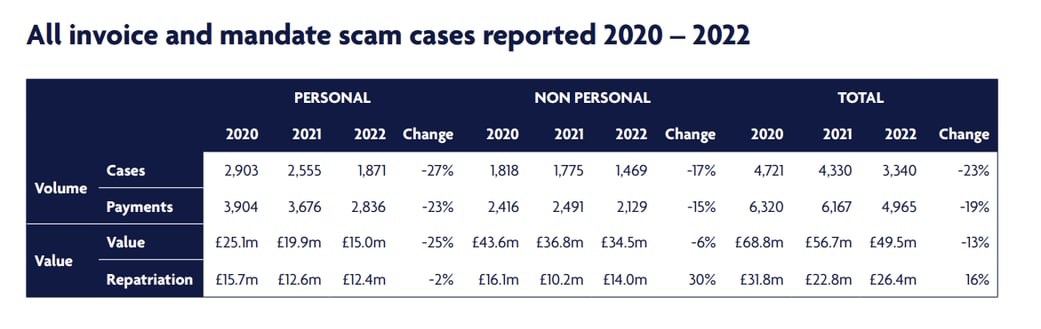
Fraud in all forms accounts for over 40% of crime committed in England and Wales.
What is the difference between a duplicate and a fraudulent invoice?
Duplicate invoices:
A duplicate invoice is a legitimate invoice that has been submitted more than once. This can happen due to human error, for example, when an invoice is mistakenly sent twice by a supplier, or when an invoice is entered into a payment system more than once by the receiving company’s accounts payable department. Duplication can also occur due to a lack of communication between departments or because of poorly managed accounts-payable processes. While duplicate invoices are the result of error rather than fraud, they can still result in financial loss if the oversight goes undetected and the invoice is paid multiple times.
Fraudulent invoices:
A fraudulent invoice is a deliberate attempt to trick an organisation into paying for goods or services that were never delivered or provided. These can be created by external fraudsters posing as legitimate suppliers, or by internal staff exploiting weaknesses in payment systems. Fraudulent invoices may include charges for inflated amounts, for products or services not received, or they may be completely fabricated. Unlike duplicate invoices, fraudulent invoices represent a deliberate act of theft or deception.
In summary, the key difference is one of intent: duplicate invoices are genuine but mistakenly submitted or processed more than once, while fraudulent invoices are intended to defraud the organisation. Both issues can result in financial loss and require robust processes and systems to prevent and detect them.
How can DocuWare prevent duplicate invoices?
When invoices are mistakenly archived twice, it not only results in extra work but, in the worst case it can lead to double payments. DocuWare’s solution is designed to catch these duplicates as soon as they are filed. This proactive approach ensures that only unique invoices move forward in the processing chain, thereby maintaining the integrity and accuracy of the financial records. Here is how it works:
- DocuWare's is activated the moment an invoice is added to the system. It's designed to immediately identify and stop any duplicates. This proactive step is the key to ensuring that each invoice is unique and that financial records remain accurate.
- At the centre of DocuWare's system is the Workflow Manager, a smart tool that keeps your invoice processes running smoothly. It checks if an invoice with details such as the vendor's name or invoice number has already been filed. This careful checking is essential to catch any duplicates at an early stage.
- Another important part of DocuWare is setting up data for the file cabinet. This involves comparing new invoices with those already filed. The system checks that the invoice number and supplier details match those on file and ensures that the document IDs are different to catch duplicates. It uses an intelligent method to compare these details across all documents.
- The final step is the 'duplicate exists' condition, which alerts the system if it finds a duplicate invoice. This level of automatic checking is a major reason for DocuWare’s effectiveness.
The way DocuWare handles invoices not only makes the process smoother, it also reduces the risk of errors such as double payments. Automatic duplicate checks save a lot of time and effort, allowing companies to focus on more important tasks. The system is also easy to use and works well for accounting departments of any size and with any number of invoices.
How does DocuWare protect me from fraudulent invoices?
DocuWare has a smart way of keeping an eye out for fraudulent invoices and protecting your business. Here's how it works:
- DocuWare can either keep a copy of your supplier's records from your company's main business software (ERP) in one of its file cabinets, or it can directly access these details directly online from your ERP system. This information includes important details such as the bank account numbers of your suppliers to which you send payments.
- When a new invoice arrives, DocuWare doesn't just file it away. It carefully checks the bank account number on the invoice and compares it to the bank account number you have on file for that supplier. This is where DocuWare's smart system comes into play.
- If the bank account numbers don't match, DocuWare immediately sends an alert. This alert lets you know that something might be wrong and the invoice could be a fake. Users are immediately alerted to the potential for fraud, helping to prevent erroneous payments.
This feature of DocuWare is like having a vigilant guard on your side, making sure the invoices you pay are legitimate and correspond to the right supplier. It's an important tool in your arsenal to protect your business from becoming a victim of fraud.
If you have any further questions, reach out to us!
