
<img height="1" width="1" style="display:none;" alt="" src="https://px.ads.linkedin.com/collect/?pid=7444762&amp;fmt=gif">

Questions & Answers about the
new DocuWare Partner Program

How much does a Partner have to pay per year?

From January 2025, the annual Partner fee will depend on which DocuWare in-house system you choose. The new Partner package includes: 

  • DocuWare system (Cloud 15 / 40 / 100) for in-house use (including support hotline and all upgrades/updates). An on-premises system can also be purchased. 
  • Marketing materials
  • Training credits to purchase the desired training courses for Partner employees. 

An additional one-off Partner fee is charged for new Partners (this is not relevant for existing Partners).

For prices, see current price list: EMEA | UK (US and LATAM Partners, please contact your management team.) 

Please note: 

  • The favorable Partner fee for the in-house system is based on Partners achieving "Silver" status (or higher) in the first full 12 months after the start of the contract term and retaining this status in subsequent years. 
  • If this status is not achieved, DocuWare is entitled to invoice the Partner for the costs of the in-house DocuWare system for the following 12 months in accordance with the current price list minus the corresponding Partner discount.
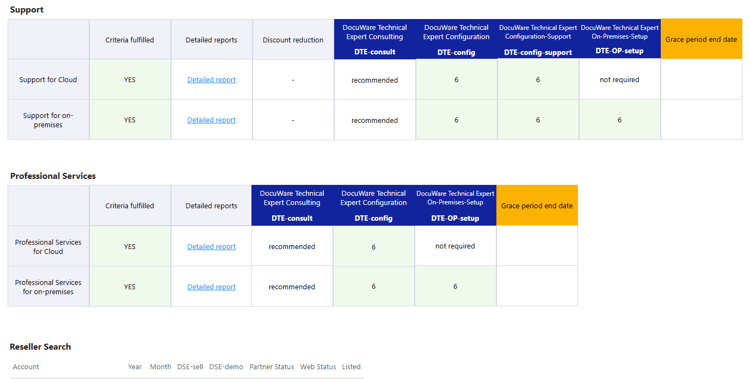
Are DocuWare Partners contractually obligated to complete the DocuWare Technical Expert course "DTE-OP-setup" in order to sell on-premises systems?

No, there is no contractual obligation to sell a DocuWare system, whether it is an on-premises or cloud system. Every Partner may sell independently of certifications. However, certain conditions and rules are associated with missing certifications.

Are DocuWare Partners contractually obligated to complete the DocuWare Technical Expert course "DTE-config" in order to provide support services for their DocuWare customers?

DocuWare Partners need to complete the following DocuWare Technical Expert (DTE) courses in order to provide support services for their customers:

  • For Cloud systems: DTE-Config and DTE-Config-Support
  • For on-premises systems: DTE-Config, DTE-Config-Support and DTE-OP-setup

If a DocuWare Partner does not have a valid DocuWare Technical Expert (DTE) certification, the Partner's discount will be reduced by 5%. This affects all Partner levels.

Which courses should a Partner have in order to provide Level 1 support?

DocuWare Partners need to have the following DocuWare Technical Expert (DTE) certifications in order to provide 1-Level support, depending on the customer system:

  • For Cloud system systems: DTE-Config and DTE-Config-Support 
  • For on-premises: DTE-Config, DTE-Config-Support and DTE-Setup

Do Partners need both DocuWare Sales Expert courses (DSE-Sell and DSE-Demo) to sell a DocuWare system?

No, there is no contractual obligation to sell a DocuWare system, whether it is an on-premises or cloud system.

However, certain conditions are associated with the courses:

Reseller Search

  • All Platinum Partners will always be listed on our website's Reseller Search feature, regardless of whether they have completed a DocuWare Sales Expert (DSE-Sell and DSE-Demo) course or not.
  • Gold and Silver Partners need to be certified as DocuWare Sales Experts (DSE) with both certification courses (DSE-Demo and DSE-Sell) to be listed.

Diamond Club Members 

  • All Platinum Partners do not need to be certified as DocuWare Sales Experts (DSE-Sell and DSE-Demo courses). However, please take the other rules into account.
  • Gold and Silver Partners need to be certified as DocuWare Sales Experts (DSE) with both certification courses (DSE-Demo and DSE-Sell) to be listed. Additionally, the other rules also need to be taken into account.

What are the new certifications for Partners?

The new Partner certifications are:

  • DocuWare Sales Professional (DSP) - replaces the former DocuWare Sales Advisor (DSA) 
    • Role: First contact with customers, knows the benefits of document management and common use cases, creates customer interest.
  • DocuWare Sales Expert (DSE; with DSE-demo AND DSE-sell certificates) - replaces the former DocuWare Application Consultant (DAC) and DocuWare Cloud Consultant (DCC)
    • Role: Sell and/or demo the solution, assess prospect needs, create custom solution proposals.
  • DocuWare Technical Expert (DTE; with DTE-config, DTE-Config-support, and DTE-OP-setup courses) - replaces the former DocuWare System Consultant (DSC) 
    • Role: Plan, configure, and implement DocuWare Systems, provides customer support

When do the new certifications associated with the new Partner agreement take effect?

The courses have already been updated to the new concept and have been published in the LMS at https://academy.docuware.com since the beginning of February. Partners who already have a certificate from the previous course or recertification program (DSA, DCC, DAC, DSC) that is valid until December 31, 2025, do not need to take the courses for the new certifications (DSP, DSE, DTE). DocuWare will convert existing certificates.

This is what the conversion will look like: 

  • Every Partner holding a certification until Dec 31, 2025, will receive the new certificates automatically - valid until December 31, 2025.
    • DocuWare Sales Advisor (DSA) --> DocuWare Sales Professional (DSP)
    • DocuWare Application Consultant (DAC) --> DocuWare Sales Expert (with DSE-demo AND DSE-sell) certification
    • DocuWare Cloud Consultant (DCC) --> DocuWare Sales Expert (with DSE-demo AND DSE-sell) certification
    • System Consultant (DSC) --> DocuWare Technical Expert (with DTE-config, DTE-Config-support, DTE-OP-setup) certification

Partners can choose which of their current certificates they want to extend through the end of 2026 by successfully completing the 2025 recertification program.

Those who wish to take the new courses, for example, to refresh their knowledge, are welcome to do so, but should be aware that:

  • Credits will be deducted from their Partner quota for several trainings.
  • This will be considered as new Base Certification with a validity date of December 31, 2026.
  • The expiration date December 31, 2026 will exclude them from the 2025 recertification program.

What if a Partner didn't finish their DocuWare System Consultant (DSC) certification in 2024?

Partners who submitted their configurations for evaluation by December 31, 2024, have been awarded a DocuWare System Consultant (DSC) certificate that is valid until December 31, 2025, provided that all online exams have been successfully passed and the configurations have been evaluated as sufficiently functional.

Those who did not pass are welcome to take the DocuWare Technical Expert course "DTE-Config". However, please note that starting in 2025, credits will be charged for the training.

Anyone who started their DSC self-study prior to the release of the DTE-Config course, but did not complete it in time, has been automatically enrolled in the new DTE-Config course and can continue working on their certification there. Credit points are required for this. If successfully completed during 2025, this certificate will be valid until December 31, 2026. The people in this group have been automatically notified by email.

Are existing certificates automatically converted into new ones?

Yes, existing certificates valid until December 31, 2025, will be mapped and converted to the new ones. Due to the interdependencies between all the affected applications, we do not have a final date for when this migration will take place (My Business, LMS, etc.).

This is what the conversion will look like:
Every Partner holding a certification until Dec 31, 2025, will receive the new certificates automatically - valid until December 31, 2025.

  • DSA --> DocuWare Sales Professional (DSP)
  • DAC --> DocuWare Sales Expert (with DSE-demo AND DSE-sell) certification
  • DCC --> DocuWare Sales Expert (with DSE-demo AND DSE-sell) certification
  • DSC --> DocuWare Technical Expert (with DTE-config, DTE-Config-support, and DTE-OP-setup)

Partners can choose which of their current certificates they want to extend through the end of 2026 by successfully completing the 2025 recertification program.

Are there connections between the different certification courses?

DocuWare Partners can decide for themselves which courses to complete; their choices depend on their contract and their organization’s structure.

However, we recommend the following combinations, especially for technical training (DTE):

  • To effectively assist clients with configurations, it’s essential to have a thorough understanding of DocuWare system configurations. Therefore, DocuWare Partners should complete both the DTE Config and the DTE Config Support courses.
  • The same applies to on-premises systems – partners should complete the DTE-OnPrem Setup course.
  • The DTE Config and DTE Config Support courses cover the configuration of both cloud and on-premises systems. If a single person is responsible for both types, we recommend completing all three courses.

For the sales training DocuWare Sales Expert (DSE), if the same person takes both the DSE Sell and DSE Demo courses:

  • If the person is experienced and familiar with sales and software sales methods, but has no experience with the DocuWare product, we recommend starting with the DSE Demo course. This course provides technical insights and valuable context for the sales process.
  • If the person already has experience with the DocuWare product, we recommend beginning with the DSE Sell course to better understand the DocuWare sales process.
  • If someone has no experience in either area, we recommend beginning with the DSE Demo course.

How will the recertification work for the new training program?

Recertification in the new training program works the same way as before. Certified DocuWare Partners need to recertify every year to validate and extend their certifications. It remains at the discretion of the DocuWare Partner which certifications they want to extend.
 
However, there are certain conditions associated with missing certifications:
  • For DocuWare Technical Experts (DTE), see "Partner Program" section
  • For DocuWare Sales Experts (DSE), see "Partner Program" section.

How are seats for live courses allocated?

Participants can reserve a seat for their desired course and course date directly in the LMS catalogue. If a course is already full, they will automatically be placed on the waiting list. If a seat becomes available, it will automatically be assigned to the next person on the waiting list. Participants can register for courses up to five calendar days before the start date.

After booking, courses will appear in the LMS under “My Trainings.” All necessary information to prepare for the course, including the link to join the online session, will be available there. All registrations are managed on a first-come, first-served basis. This applies to both course bookings and the waiting list.

If a Partner can no longer attend, we ask that they send written notice of cancellation to academy@docuware.com as soon as possible. This allows us to offer their seat to someone on the waiting list or to free up space for others.

In each instance, candidates will receive an automatic status email from the LMS. Since participants register using their individual single sign-on (SSO) login in the LMS, each Partner must sign up for courses themselves. It is not possible to reserve a seat for colleagues.

How are seats for self-study courses allocated?

Participants can book a course in the catalogue, receive an automatic notification from the LMS, and start the course immediately.

After booking, courses will appear in the LMS under “My Trainings.” The course can be paused and resumed at any time.

The number of seats is unlimited, so there is no waiting list.

Under what conditions can DocuWare cancel a live training?

  • If the trainer is ill.
  • If the minimum number of participants has not been reached three days before the start date.

What is the cancellation policy for participants?

If a Partner cannot attend the training, we ask that they send written notice of cancellation to academy@docuware.com as soon as possible. This allows us to offer their seat to someone on the waiting list or to free up space for others.

Please note: In the event of an unexcused absence (no-show), the applicable number of credits will still be deducted from your account (see: current price list).

Where can partners view the status of their recertifications?

In “My Business” under “Customers and Prospects / View All / Partner Qualification Report,” the partner's administrators can see in the “Course Overview” section

  • who has which certification and
  • how long each certification is valid.

How many credits does a training cost?

The costs for credits are listed in the current price list:

  • DocuWare Sales Professional (DSP) - 0
  • DocuWare Sales Expert Sell (DSE-sell) - 2
  • DocuWare Sales Expert Demo (DSE-demo) - 2
  • DocuWare Compliance Advisor (DCA) - 0
  • DocuWare Technical Expert Consulting (DTE-consult) - 0 
  • DocuWare Technical Expert Config (DTE-config) - 2
  • DocuWare Technical Expert Config Support (DTE-config-support) - 0
  • DocuWare Technical Expert OnPrem Setup (DTE-OP-setup) - 0

For prices, see current price list: EMEA | UK | US and LATAM Partners, please contact your management team. 

Does recertification cost credits?

A training costs credits whenever it requires the involvement of a trainer. For example, a classroom training session or the individual evaluation of submitted exercises for certification. 

This means that the cost of certification in credits may change in the future if the format of the trainings changes. Such changes will be communicated in a timely manner and be reflected in the price list. 

Why do some trainings cost credits while others don't?

This depends on the kind of (re-)certificaton:

  • No credits are needed if it is a self-study.
  • Credits are needed whenever a trainer is involved (e.g. as presenter or for checking delivered homework).

When are credits charged - at registration or after the training?

Credits are charged when a Partner has successfully completed the training and has been awarded the certificate.

Please note that the applicable credits for the training course will also be deducted from the Partner's quota if the Partner does not attend their registered course without having canceled (no-show).

No credits will be deducted for attending breakout sessions during DocuWorld.

What happens if there are unused credits at the end of the year?

DocuWare Partners get a credits allocation based on the Partner Support Package each year.

Each credit is valid for a period based on the annual term of the Partner agreement. Credit points expire at the end of a calendar year (December 31).

Are credits charged in case of a "no show" of a training?

Applicable credits for the training course will be deducted from the Partner's quota if the Partner does not attend the course without having canceled (no-show).

How does a Partner get more credit points if all credit points are spent before the end of the year?

Partners can purchase additional credit points via sending an order to orders@docuware.com (EMEA) or dworders@docuware.com (US/LATAM). Each credit is valid for a period based on the annual term of the Partner agreement. The cost per credit point is $250 USD/Euro.

Please note that the applicable credit points for a training course will be deducted from your quota even if you do not attend the course without having canceled (no-show).

Where can Partners track their credits?

In “My Business” under “Customers and Prospects / View All / Partner Qualification Report,” the partner's administrators can see in the "Credits” section

  • how many credits have been redeemed and
  • what the current status of their credit budget is.

How many credits does a Partner get every year?

DocuWare Partners get a certain amount of credits based on the Partner Support Package each year.

  • DocuWare Cloud 15: 14 training credits for participation in certification courses
  • DocuWare Cloud 40: 28 training credits for participation in certification courses
  • DocuWare Cloud 100: 35 training credits for participation in certification courses
  • DocuWare On-Premises 40 (package is only available with one of the other Partner Support Packages): 6 training credits for participation in certification courses

Each credit is valid for a period based on the annual term of the partner agreement. Credits expire at the end of a calendar year (December 31).

Platinum Partners receive additional free credits in addition to their Partner Support Package:

  • Platinum Partners: 9 credits
  • Platinum Premier Partners: 18 credits
  • Platinum Elite Partners: 36 credits

When will Partners be listed on DocuWare's website Reseller Search feature?

As a DocuWare Partner, you will be listed based on the following rules:

  • All Platinum Partners will always be listed, regardless of whether they have a DocuWare Sales Expert (DSE) certification or not.
  • Gold and Silver Partners need to be certified as DocuWare Sales Experts (DSE) with both certificates (DSE-Demo and DSE-Sell) to be listed.
  • Base Partners will not be listed regardless of the sales certificates they have.

How can Partners be listed in the DocuWare Reseller Search with multiple locations in a country?

As a DocuWare Partner, you will be listed with several locations (in a country) based on the following rules:

  • Platinum Partners: Even though they will always be listed, they must prove that the additional location is not a letterbox company, a home office, etc. Furthermore, it needs alignment with the corresponding Regional Sales Director/Channel Manager to ensure that the on-site person is qualified to sell and demo DocuWare solutions.
  • Gold and Silver Partners have to confirm, that
    • The additional location is not a letterbox company, a home office, etc.
    • There is someone on staff who can sell and demo DocuWare solutions. This person needs both DocuWare Sales Expert (DSE) certificates (DSE-Sell and DSE-Demo).
  • Base Partners will not be listed regardless of the sales certificates they have.

Contact Us

How can we help you?

If you have any questions that are not answered in the FAQ section above, please complete the form on the right and we will get back to you as soon as possible. 

Your ideal companion
Use the free event app
With our event app (available March 2024), we’re again providing a helpful companion for the DocuWorld Partner Conference. It’s a great resource that contains the latest information on the agenda, lectures, keynote speakers (general sessions etc.), internal and external speakers, trade exhibitors and much more.